Jigsaw and Quantower DOM Alternative: A Simpler Way to Practice Order Flow
Not all DOMs are the same. Most will show price, best bid and best offer. But some platforms like Jigsaw, Quantower, and MarketByOrder show market orders as well as additional columns. Using these additional columns gives us a better view into the interaction between traders.
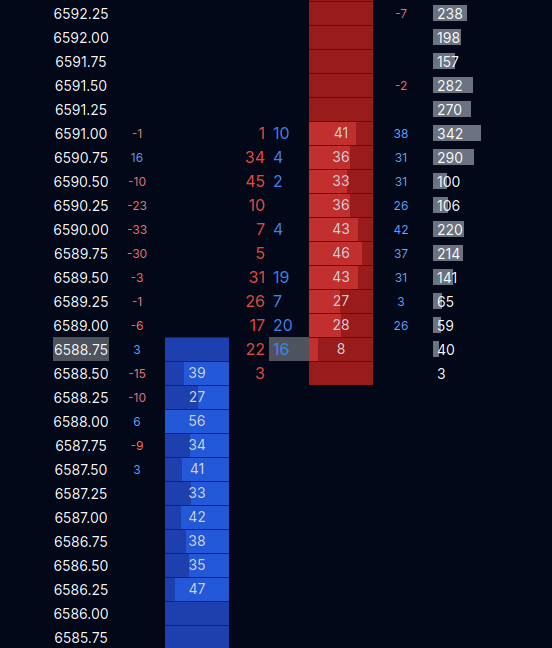
Above we see a DOM from MarketByOrder. The columns in the center show us market orders and the columns to the left and right of the bids/offers are stacking and pulling columns.
What do these columns tell us? The book, or limit orders, rarely show how much volume is actually available. By looking at how many orders get traded or dont get traded, we can see the actual strength or weakness at certain levels. Lets look at the price 6590.00 for example. We see a -33, that means there were 33 contracts pulled from the book at that price. And we see the market sells of 7 in that same row. So as soon as a couple sellers hit that price, buyers fled.
While we cant intuit exactly why buyers fled that price, we can see over time how buyers or sellers act. Maybe we see lots of stacking at lower prices, so their are buyers around, but they are just currently being price sensitive.
If you want a broader comparison of order flow tools and pricing, see Best Order Flow Backtest Software: Features and Pricing. If you want a quick DOM walkthrough first, use the DOM guide.