Depth of Market (DOM) / Price Ladder
The DOM displays the order book as a vertical price ladder, with bids on the left and offers on the right. Use it to watch liquidity shift around the current price and place trades directly into the book.
Already familiar with the DOM? How to read the DOM · DOM examples from a real NQ session
DOM Overview
This screenshot gives a quick reference for the layout.
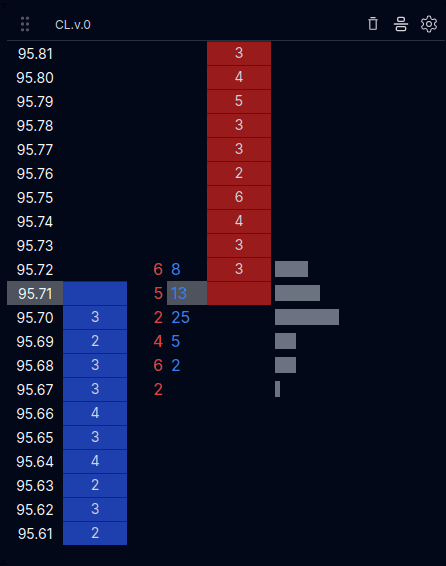
Here we have Crude oil (CL) continuous contract (.v.0). Price on the far left, then blue bid column, market sells, market buys, ask limits, and total volume.
What the DOM Helps With
- See where resting liquidity is concentrated above and below price.
- Watch how limit orders stack and pull as price approaches a level.
- Place trades directly from the ladder.
- Track traded volume at each price via the histogram.
Order Mechanics
Limit Orders
- Click a bid limit to join the queue. If the bid shows
5and you join, it becomes6- five contracts must trade before you fill. - Clicking an empty bid/offer box places a limit at that price. If there's standing liquidity on the other side, it behaves like a marketable limit and can fill immediately.
- As limits trade, resting size decreases and your queue position advances.
Market Orders
- Buy Market lifts the best offer - you'll see an aggressor buy print and the sell limit at that level decrease.
- The price level is outlined in blue when you're long and red when you're short.
- Sell Market hits the best bid to exit or go short; the bid limit at that level decreases.
Trades & P&L
- P&L updates immediately on entry. Example:
–12.02=–2.02commissions +–10.00if you closed into the next tick down. - Session P&L includes fees: opening and closing trades cost a specific commission per side.
- The right-side volume histogram aggregates traded volume by price; use it to see where buying/selling concentrated.
Controls / Settings
- Clear trades - Remove recent trade markers while preserving volume histogram
- Center DOM - Automatically center the ladder around the last traded price