Futures backtesting with order flow
Test a futures strategy on real past sessions, tick by tick. Pick an instrument, a date and a start time, then trade it by hand on the DOM and footprint chart, or let an algo run it over every trade. Everything runs in your browser.
Includes 5 minutes of replay time free daily, shared across up to 3 replays.
Backtest by hand
Most of the time you want to know whether you can trade a setup, not whether a formula makes money. That means taking the trade yourself, in the conditions you would take it live.
- Pick an instrument and a session. The DOM, the chart and the time and sales replay together, with every trade and every change in the book.
- Play at any speed from 0.01x to 16x, and pause whenever you want to think.
- Place Sim orders on the DOM or the chart, with a take profit and a stop loss attached, and watch them fill against the real market.
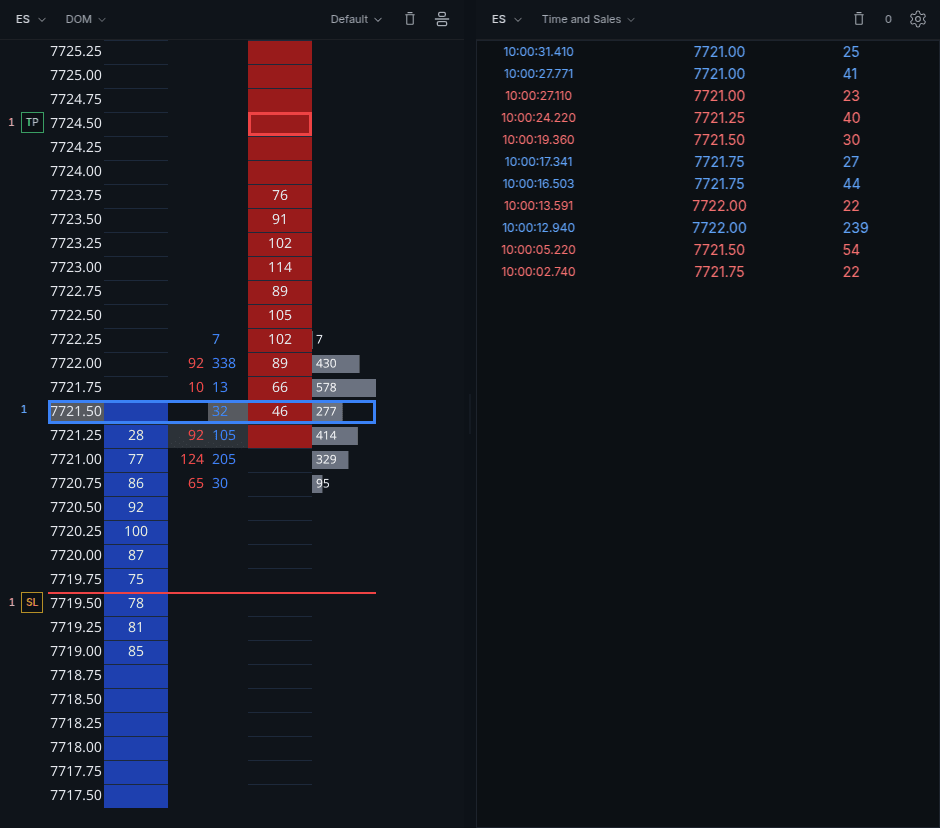
Jump straight to your setup
A full session is six and a half hours, and most of it is not your setup. Scroll the day on the footprint chart first and find each place your setup appeared, by eye or with an indicator such as Big Trades.
Then right click the bar and pick Replay from here. The replay goes back to the start of that minute and the bar builds again trade by trade, so you can take the trade as if it were live. When it is done, move on to the next one, without sitting through the quiet hours in between.
Review your results
Every Sim trade is kept. The dashboard adds them up across sessions so you can see whether a setup holds up after fifty attempts, not five:
- Net P&L, win rate and profit factor
- Net R:R and average win against average loss
- Average time in a trade
- How you exited: profit target, stop loss or by hand
- How you entered: market, limit or stop orders
New to the ladder? How to read the DOM covers what to watch before you start taking trades.
Backtest an algo
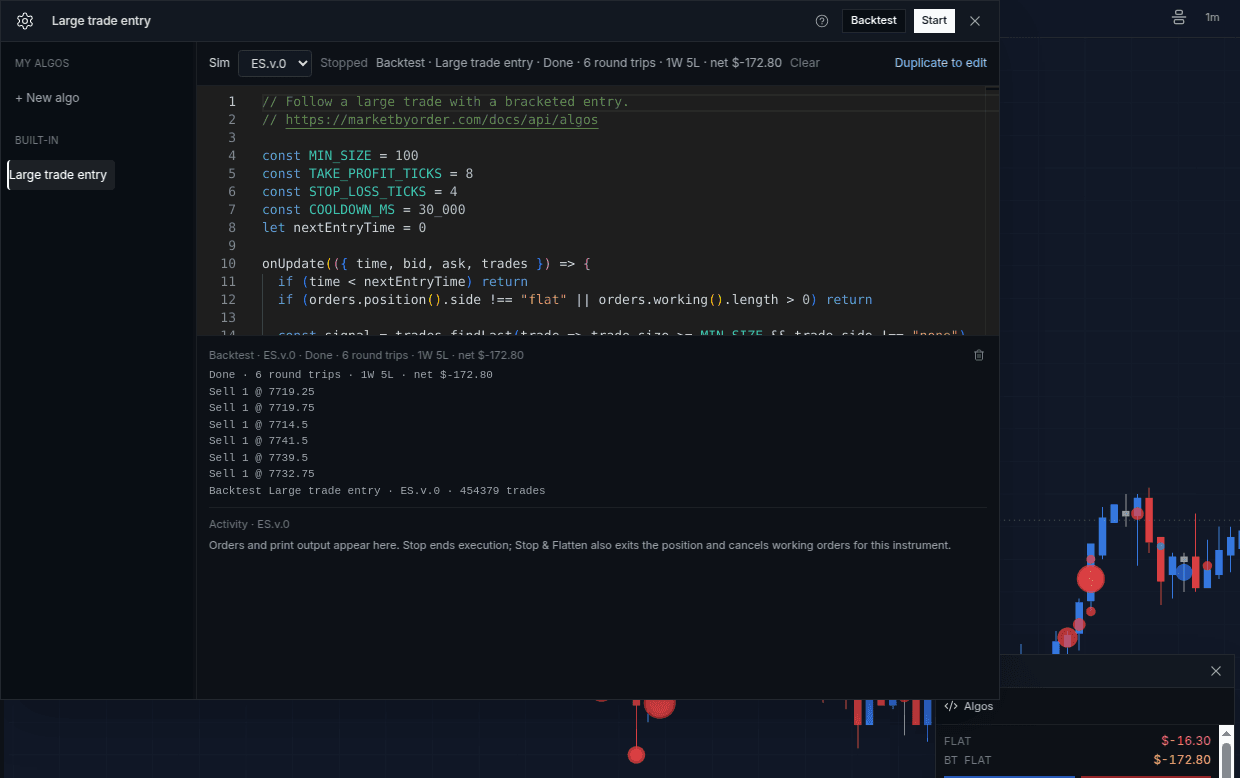
When an idea is mechanical, write it as an algo and let it trade the session for you. The built-in Large trade entry algo waits for an aggressive trade of 100 contracts or more, enters one contract in the same direction with an 8 tick target and a 4 tick stop, then waits 30 seconds before it can enter again.
Large trade entry
Built into Algos. Press Duplicate to edit to change the size, target or stop.
// Follow a large trade with a bracketed entry.
// https://marketbyorder.com/docs/api/algos

const MIN_SIZE = 100
const TAKE_PROFIT_TICKS = 8
const STOP_LOSS_TICKS = 4
const COOLDOWN_MS = 30_000
let nextEntryTime = 0

onUpdate(({ time, bid, ask, trades }) => {
  if (time < nextEntryTime) return
  if (orders.position().side !== "flat" || orders.working().length > 0) return

  const signal = trades.findLast(trade => trade.size >= MIN_SIZE && trade.side !== "none")
  if (!signal) return

  if (signal.side === "buy") {
    orders.buy(1, {
      tp: ask + TAKE_PROFIT_TICKS * tickSize,
      sl: ask - STOP_LOSS_TICKS * tickSize,
    })
  } else {
    orders.sell(1, {
      tp: bid - TAKE_PROFIT_TICKS * tickSize,
      sl: bid + STOP_LOSS_TICKS * tickSize,
    })
  }
  nextEntryTime = time + COOLDOWN_MS
})
Before you backtest, check the signal on the chart. Turn on Big Trades from the Indicators panel and every large aggressive order gets a circle, blue for buys and red for sells. Scroll the day and look at what price did after each one.
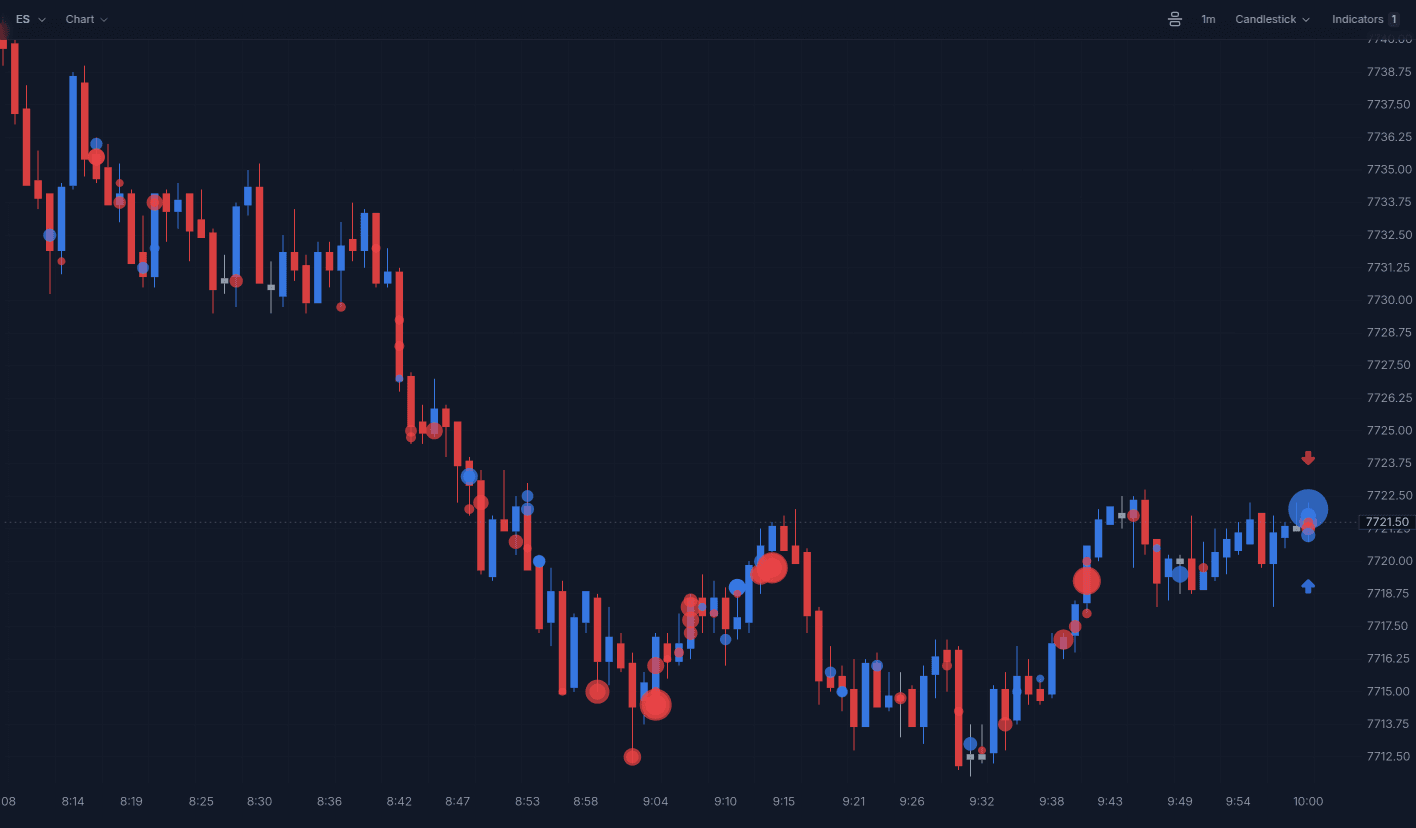
Then open Algos from the order panel, pick Large trade entry and press Backtest. It runs over every trade the chart has loaded, oldest first, on a separate account, so your Sim position and trade history are untouched. Scroll the chart further back to test more days.
When it finishes you get round trips, wins, losses and net P&L after commission. This run covered 454,379 ES trades and took 6 round trips.
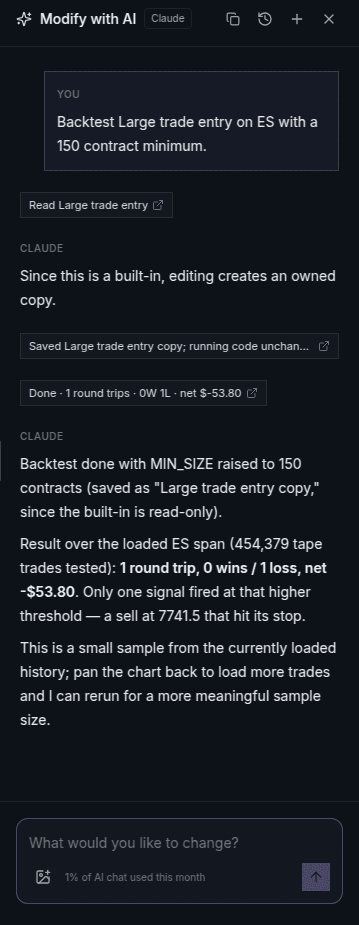
To try a variation, change a number and press Backtest again. Or ask the chat: "Backtest Large trade entry on ES with a 150 contract minimum." It saves a copy with the new minimum, runs it and reads the result back.
Why every trade, not every bar
Most backtesters work on bars: an open, a high, a low, a close and a volume for each minute. That is enough to test a moving average cross. It is not enough to test an order flow idea, because order flow happens inside the bar: who hit the offer, how big the order was, and what the book looked like when it landed.
A bar can't see the signal
A one minute ES bar might say 9,000 contracts traded. It can't say that one of them was a 300 lot that lifted the offer, which prints were buyers and which were sellers, or that the bid was pulled a second before price dropped.
So an idea like "when a large aggressive buy prints, go long" can't be written against bars at all. The usual workaround is a proxy, such as a volume spike or a big candle, and that tests a different idea from the one you had. On tick data the signal is the data: every trade arrives with its size, its side and the prices it filled at.
Which came first, the target or the stop?
Order flow trades are short. A 2 point target and a 1 point stop on ES fit inside one busy minute, so a single bar often reaches both. The bar only records the highest and lowest prices, not the order they came in, so a bar backtest has to pick one. Some assume the target, some assume the stop, some guess from where the bar opened. Every one of those rules is wrong some of the time, and the error lands on exactly the trades you care about.
Walking the trades one at a time removes the guess. The stop and the target are checked after every print, so the backtest records whichever price actually traded first.
When a limit order fills
On bars, a buy limit usually counts as filled the moment the bar's low touches its price. In a real market you join the back of a queue at that price, and a touch often trades the orders in front of you and leaves yours resting. Strategies that buy the low tick look great on bars for this reason.
In an algo backtest a buy limit fills only when the offer comes down to your price, which means every bid resting there has traded or been pulled. A sell limit, including a profit target on a long, waits for the bid to come up to it. That rule never gives you a fill you might not have got. It can miss a fill you would have had at the front of the queue, so treat limit results as the cautious case.
Stops pay the spread
A bar backtest usually fills a stop at the stop price. Here a stop triggers when a trade prints at or through it, then fills at the bid for a sell and the ask for a buy at that moment. When price is moving fast that can be a tick or more past your stop, the same as a live stop market order. Market entries work the same way: a buy fills at the ask, a sell at the bid.
The bid and ask come from the recorded order book when there is a snapshot within two seconds of the trade. Without one, the quote is taken from the trade itself: a buy printed at the ask, a sell at the bid, with the other side one tick away.
No peeking at the close
A common bar mistake is to read a signal off the close and enter at that same close. By the time the bar has closed, that price is gone. On tick data the algo runs after each trade and sees only the trades up to that one, so anything it decides fills at the next price the market offers.
Results from full runs
Backtesting Big Trades ran the large trade idea over five days of CL and ES. On CL, a version that only trades into thin liquidity and exits after 5 minutes took 90 round trips, won 53 and made $1,636.40 after commission. On ES it made $112.50 before commission and lost $73.70 after it, at $3.80 on each of its 49 round trips.
Backtesting Absorption tested whether absorption marks a reversal. Trading it directly did not work, which is as useful to know before you risk money on it.
Both include the algo so you can run it yourself.
What you can backtest
Every instrument below replays without a data subscription:
- Energy: CL (Crude Oil), NG (Natural Gas)
- Equities: NQ (E-mini Nasdaq-100), MNQ (Micro E-mini Nasdaq-100), ES (E-mini S&P 500), MES (Micro E-mini S&P 500), RTY (Russell 2000), YM (E-mini Dow Jones Industrial Average), MYM (Micro E-mini Dow Jones Industrial Average), M2K (Micro E-mini Russell 2000), FDAX (DAX Index)
- Metals: GC (Gold), MGC (Micro Gold), SI (Silver)
- Interest Rates: ZN (10-Year U.S. Treasury Note)
- FX: 6E (Euro FX), M6E (Micro Euro)
- Cryptocurrencies: BTC (Bitcoin)
- Spot forex: EURUSD (Euro / US Dollar), XAUUSD (Gold / US Dollar)
Spot forex has bid and ask quotes but no trades, because it has no central exchange. For order flow on the euro or gold, use 6E or GC; Replaying EURUSD and XAUUSD explains why. The instruments page also lists what you can load with your own Databento key.
Questions
Is futures backtesting free?
Every account gets 5 minutes of replay time free daily, shared across up to 3 replays. Pro removes the daily limit.
Can I backtest NQ and ES?
Yes. NQ, ES, their micros MNQ and MES, and the other futures listed above all replay with full order book depth and every trade.
How far back does the data go?
It depends on the instrument, and new days are added every night. The date picker in the app only offers days we have, so any day it lets you pick will replay.
How is this different from bar replay?
Bar replay steps through candles, so it cannot show who traded inside a bar or in what order prices traded. Here the DOM, the footprint chart and the time and sales replay every trade and every change in the book, and orders fill against that.
Do I need to record or buy market data?
No. The history is already stored and included in the free daily allowance and the paid plans. If you want an instrument we do not carry, you can connect your own Databento key.
Want to see a replay first? Market replay walks through three moments from one NQ session on the DOM.