Sim Trading With Order Flow: DOM, Footprint and Time and Sales
By Geoff ·
Most sim accounts fill your orders off the chart price. To practice order flow trading, you need the rest of the picture as well: the resting bids and offers on the DOM, the trades hitting them, and the footprint building bar by bar. A sim trade only teaches you something when its fill comes from that same order book.
MarketByOrder replays a past futures session tick by tick, with the full order book, in your browser. You trade it with a Sim account: orders go on the DOM ladder or the chart, fill against the orderflow of that session, and every trade is kept so you can see whether a read actually makes money.
What you need
- A free account. No broker account, no funding, no market data subscription.
- A browser. Nothing to install and no data to record or download.
- An instrument, a date and a start time. Pick the cash open on ES or NQ, a CL inventory report, or any session on the instruments page, and press play.
Place sim orders from the DOM
Click a cell in the Bid or Ask column of the DOM ladder. The order size is the Qty in the order panel, kept per instrument.
| Click | Places |
|---|---|
| Bid column, at or below the best ask | Buy limit at that price |
| Bid column, above the market | Buy stop at that price |
| Ask column, at or above the best bid | Sell limit at that price |
| Ask column, below the market | Sell stop at that price |
| A cell holding one of your entry orders | Cancels that order and its target and stop |
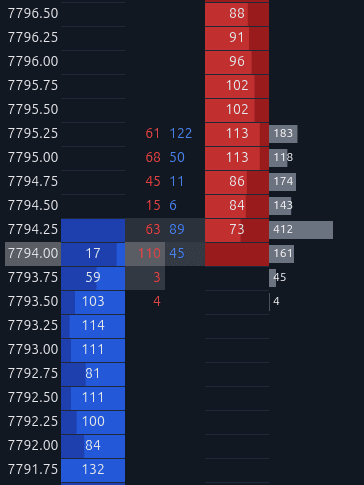
You can also place and drag orders on the chart, so the same trade works off a footprint level or a heatmap wall.
Targets, stops and the order panel
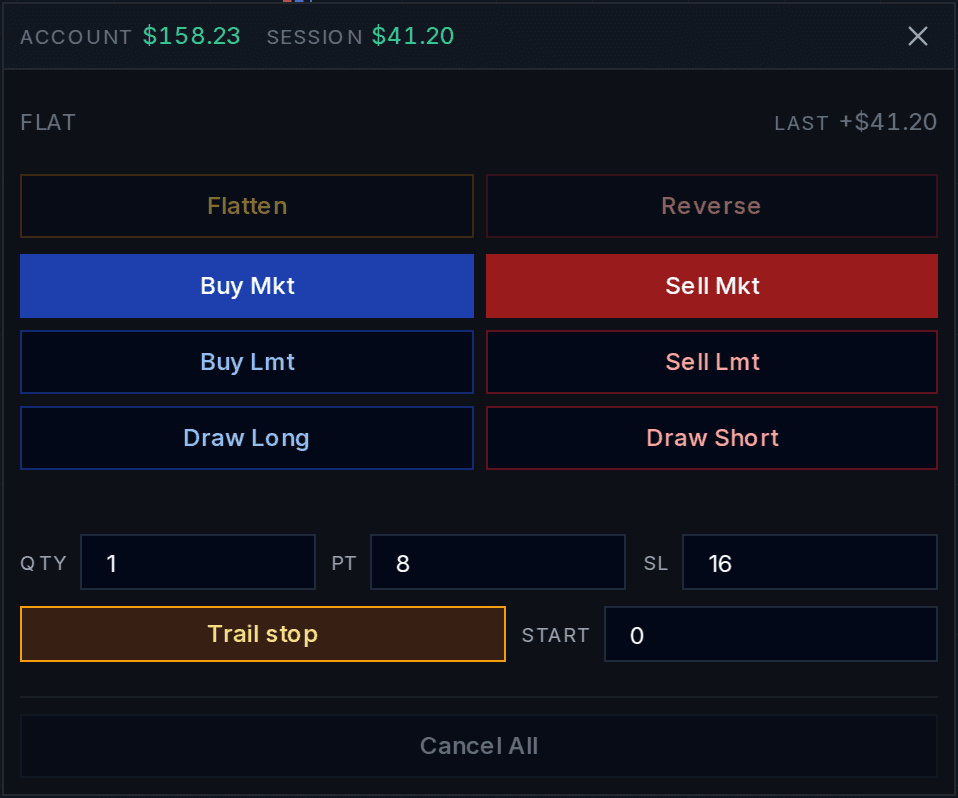
- PT and SL set a profit target and a stop loss in ticks. Above 0, every entry gets them automatically, and when one fills the other is cancelled.
- With both at 0, drag the TP and SL buttons from your entry row to any price instead.
- Buy Mkt and Sell Mkt trade at the best price on the other side. Flatten closes the position and Cancel All removes working orders.
- Adding to a position, scaling out and flipping all work, and the targets and stops resize with it.
Stop losses
- Set SL in ticks and every entry gets a stop that far away, or drag the SL button from your entry row to a price on the DOM or the chart.
- While you are in a position, clicking the exit side of the ladder moves your stop or your target to that price.
- A stop triggers when a trade prints through its price and fills at the best price on the other side. In a fast market that can be a tick or more past your stop, the same slippage you would get live.
Trailing stops
- Turn on Trail stop in the order panel. It needs SL above 0, because SL is the distance the stop keeps behind price.
- On a long, the stop follows the highest trade since entry, SL ticks below it. On a short, it follows the lowest trade. It only ever moves in your favour.
- Start holds the stop still until the trade is that many ticks in profit. At 0 it follows straight away.
- Drag a trailing stop closer or further away and it keeps trailing from the new distance.
How sim fills work
Fills come from the recorded order book and trades of the session, not from a candle close. A market order takes the best offer or bid at that moment. A stop triggers when a trade prints through its price and fills at the best price on the other side. A resting buy limit fills when the best offer comes down to its price, and a resting sell limit when the best bid comes up to it.
Commission is charged per contract per side when the position closes: $1.90 on ES and NQ, $0.50 on MES and MNQ, $2.02 on CL. The order panel shows open P&L, session P&L and your account P&L.
A sim short with a trailing stop on NQ
NQ on October 28, 2026, times in ET, on a 5 second footprint. NQ had been drifting lower since the cash open, and from 9:47:15 it held a 9 point range around 29,830 for 45 seconds. At 9:48:05 it slips under the range, and the order panel sells 1 at market: short at 29,826.50, SL 16 ticks, Trail stop on.
The 9:48:10 bar trades 244 contracts on a delta of -146, with 80 sold into the bid at a single price. Each new low pulls the stop down behind it. Five seconds after the entry it has already crossed the entry price, and by 9:48:13 it sits at 29,815.00 with price at 29,812.50. The trade is up $280 open, and $220 of that is locked in by the stop.
Take the NQ short yourself
Replay NQ from 9:47:45 ETFree account required. Includes 5 minutes of replay time daily, shared across up to 3 replays. This link opens the session used in the example after signup.
Practice the same moment again
A live sim account gives you each setup once. On a replay you can take it as many times as it takes:
- Slow down when the DOM moves too fast to follow. Speeds run from 0.1x to 16x; order flow moves too fast covers how to use them.
- Pause before you click, and decide your entry, target and stop while the book is frozen.
- Right click any bar and pick Replay from here to go back and trade the same moment again, or jump to the next place the setup appeared.
Keep score across sessions
Every Sim trade is kept. The account dashboard adds them up across sessions: net P&L, win rate, profit factor, and how you entered and exited. When a setup is mechanical enough to write down, run it as an algo over every trade of the session instead of clicking it by hand.
New to the ladder? Start with how to read the DOM, then scalping ES on the DOM and practicing MNQ with a footprint chart. The DOM docs cover every column and click on the ladder, and the Depth indicator shows the same Level 2 book behind your chart.
Questions
Can I sim trade with order flow for free?
Yes. Every account gets 5 minutes of replay a day, across up to 3 replays, with the DOM, footprint chart and time and sales, and Sim orders included. Pro is $14/month with no daily limit.
Do I need a broker account or a data feed?
No. The trades and the order book for each session are already stored. Create an account, pick an instrument, a date and a start time, and press play.
What do sim orders fill against?
The recorded order book and trades of that session. A market order fills at the best price on the other side, a resting buy limit fills when the best offer comes down to it, and a stop triggers when a trade prints through its price.
Can I paper trade with Level 2 data on replay?
Yes. The DOM ladder replays each session's Level 2 order book, the resting bids and offers at each price, and your Sim orders fill against it. The Depth indicator paints the same book behind the chart.
Do I need to record Level 2 data first?
No. Past sessions are already stored with their order book, so you pick a date and press play. Desktop platforms such as NinjaTrader only replay Level 2 from replay files downloaded or recorded on your own machine.
Which futures can I sim trade?
ES, NQ, MES, MNQ, CL, GC, 6E and more CME futures. The instruments page lists every symbol and how far back its sessions go.
Can I sim trade order flow on my phone?
Yes. The replay runs in a mobile browser with the DOM, chart and an order bar for buying, selling and flattening.
Start sim trading with order flow
Open NQ on October 28, 2026Free account required. Includes 5 minutes of replay time daily, shared across up to 3 replays. This link opens the session used in the example after signup.